




The fitness world is changing fast. For years, hitting your goals meant writing down workouts by hand, guessing your progress, and hoping for the Dallas-sized results you wanted.
Today, smart wearable tech, artificial intelligence (AI), and cloud data are changing the game.
Logi Fit is leading this digital shift. It links your daily movement, sleep habits, and workout data into one easy-to-use system. This guide shows you how to use this smart tech to crush your fitness goals.
The Big Problem with Old-School Gym Routines
Why do so many people quit the gym or hit a plateau? It usually comes down to the “guesswork gap.”
Without real data, it is incredibly easy to lift too much, train too little, or miscalculate what your body needs to recover.
Switching from Feelings to Facts
The Logi Fit model replaces guesswork with cold, hard facts. By tracking data from your smart wristband or phone app, you get a clear look at your health at any moment.
The 24-Hour Fitness Cycle
True fitness does not just happen during your 60-minute workout. It happens every second of the day.
The app tracks your movement, resting heart rate variability (HRV), and deep sleep patterns. It then gives you a daily readiness score. This score tells you exactly how hard you should push yourself each day.
3 Powerful Features of the Logi Fit App
The heart of this system is its smart digital dashboard. It acts as a trainer, a workout log, and a health lab right in your pocket.
1. Live Body Tracking
The software talks directly to your wearable device to watch key health markers:
-
Heart Rate Zones: Keeps you in the perfect fat-burning or cardio zone during intense workouts.
-
HRV Monitoring: Tracks heart rate variability to see if your nervous system is stressed.
-
Sleep Mapping: Breaks your night down into light, deep, and REM sleep to measure your true recovery.
2. Hands-Free Workout Logging
Writing down your sets and reps in a notebook slows you down. Logi Fit fixes this by automating the process.
-
Smart Equipment Sync: Connects via Bluetooth to compatible gym machines to log your speed, reps, and weight instantly.
-
Easy Manual Entry: Offers a clean screen to log free weights or bodyweight moves in seconds.
-
Milestone Rewards: Tracks your personal records (PRs) and upgrades your profile as you get stronger.
3. Custom Training Plans
Great gear is useless without a solid plan. The app solves this by sending custom workouts right to your phone or watch. These plans change based on your goals, whether you want to lose fat, build muscle, or move better.
How to Set Up Your Gym Floor for Success
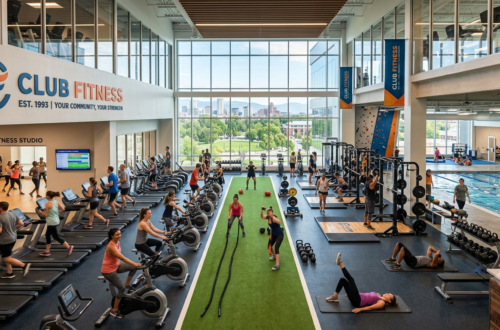
The app handles the data, but you still have to do the work. To get the best results, split your time across three main gym zones.
The Strength Zone
To build muscle and boost your metabolism, use a mix of free weights and machines. Always log your weights in the app to make sure you are lifting more over time.
The Cardio & HIIT Zone
Keep your heart healthy with treadmills, stair-climbers, and bikes. Use machines with smart screens that pair with your app to log your calories and speed automatically.
The Recovery Zone
You cannot grow if you do not recover. Use turf areas and mats for stretching and foam rolling. Over time, you will see how these recovery sessions directly improve your morning sleep scores.
Your 4-Week Smart Fitness Plan
Ready to start? Follow this simple 30-day plan to build a permanent fitness habit.
Week 1: Collect Your Data
For the first seven days, change nothing. Just wear your smart device all day and night. This builds your baseline data for sleep, steps, and resting heart rate.
Week 2: Log Your Workouts
Start your new workout plan. Focus on syncing your watch, app, and gym gear. Aim for three strength sessions and one cardio session, making sure the app saves every single move.
Week 3: Read Your Recovery Patterns
Open your data dashboard. Look at how your workouts affect your sleep. If a late-night leg day ruins your deep sleep, try working out earlier in the day.
Week 4: Make It a Habit
Review your 30-day report to see your progress and broken records. Use this data to lock in your permanent workout times. You have now turned fitness from an annoying chore into an exact science.
Frequently Asked Questions (FAQs)
1. What is Logi Fit?
It is a tech-driven fitness system that uses apps, connected gym gear, and wearable sensors to track your workouts, sleep, and recovery automatically.
2. Do I need a specific watch or tracker?
Yes. To track your live heart rate and sleep cycles, the app needs to connect to a compatible smart wristband or fitness tracker via Bluetooth.
3. Can I use the app for home workouts?
Absolutely. Even without fancy gym gear, you can use the app’s manual logger and follow built-in bodyweight routines at home.
4. Is this system good for absolute beginners?
Yes. The app cuts out gym confusion by showing video guides for exercises and matching workouts to your current fitness level.
5. How does the app track my sleep quality?
It monitors your micro-movements and heart rate while you rest to map out your light, deep, and REM sleep cycles.
6. Can my personal trainer send workouts to my app?
Yes. The app features easy trainer-to-client sharing, letting your coach upload custom routines straight to your account.
7. Does the app give medical advice?
No. The platform is designed solely for fitness and lifestyle tracking. It does not diagnose or treat medical conditions.
8. Is my personal health data safe?
Yes. The app uses modern security encryption to keep your data private and lets you delete your account at any time.
9. What are the app milestone levels?
As you log workouts and hit consistency goals, you earn points that upgrade your user level, keeping you motivated to keep going.
10. Do I need internet access to log a workout?
You can log your sets and reps offline while on the gym floor. However, you will need a Wi-Fi or cellular connection later to sync your watch and save your data to the cloud.